
APEX Developer Addon for Oracle APEX
Overview
The APEX Developer Addon enhances the Oracle APEX Application Builder with essential tools designed to improve coding efficiency and workflow. It is tailored for developers working with Oracle APEX, particularly those who rely on SQL, PL/SQL, HTML, XML, and JavaScript within the platform. The addon addresses common pain points such as limited syntax visibility, slow navigation, and lack of keyboard shortcuts, offering a more streamlined development experience. Its primary purpose is to bring IDE-like functionality directly into the browser-based APEX environment.
Target users include professional Oracle APEX developers, database administrators, and software engineers building web applications on the Oracle platform. The tool is especially useful in environments where rapid prototyping, frequent code editing, and precise debugging are required. Real-world usage scenarios include building dynamic forms, integrating backend logic with PL/SQL procedures, and structuring complex web interfaces with HTML and JavaScript.
The developer did not provide additional background information. However, the addon’s functionality suggests a focus on developer productivity and code clarity. It operates entirely within the APEX environment, requiring no external dependencies, and supports offline use, which is beneficial for developers working in restricted network conditions.
Key Features & Capabilities
- Syntax Highlighting for SQL, PL/SQL, HTML/XML, and JavaScript improves code readability and reduces errors by visually distinguishing keywords, variables, and syntax structures.
- Keyboard Shortcuts such as F10 for saving allow developers to perform common actions without navigating menus, significantly speeding up the coding process.
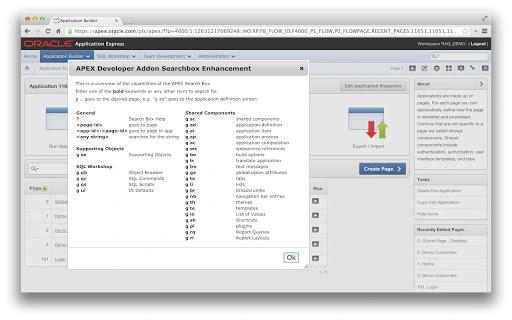
- Quick Navigation via Search Box enables rapid access to functions, components, and sections within large APEX applications. Entering “?” in the search box provides on-the-fly help.
- Minor UI Enhancements across the APEX interface contribute to a smoother, more intuitive user experience, reducing friction during development cycles.
These features are particularly effective in high-intensity development workflows where time and precision are critical. For example, syntax highlighting helps identify malformed queries during real-time editing, while keyboard shortcuts reduce repetitive mouse movements. The search-based navigation is ideal for large-scale applications with dozens of pages and components, enabling developers to jump directly to specific sections without manual browsing.
User Interface, Workflow & Performance
The APEX Developer Addon integrates directly into the Oracle APEX Application Builder interface, enhancing it without altering its core structure. Navigation remains consistent with the native APEX layout, ensuring minimal learning curve for existing users. The addon’s UI elements are context-sensitive and appear only when needed, preserving visual clarity.
Workflow efficiency is improved through the combination of keyboard shortcuts and quick search, allowing developers to execute tasks faster than with standard APEX tools. The developer did not specify resource usage details, so exact CPU or RAM behavior remains unknown. However, given its 2.5 MB size and offline functionality, it is likely optimized for low overhead. Performance observations are based on general software behavior patterns.
Stability is supported by the addon’s lightweight design and offline compatibility. No reported crashes or conflicts were mentioned in the provided information. The tool is designed to function seamlessly within the browser environment, minimizing disruptions during active development.
Compatibility & System Requirements
The APEX Developer Addon is compatible with Windows and Mac operating systems. It is designed to work within the Oracle APEX Application Builder, which runs in modern web browsers. The software version is 1.0.0, with an installation size of 2.5 MB.
Exact system requirements were not listed. The developer did not provide details on minimum hardware specifications, such as RAM or processor speed. Platform compatibility information is limited to the operating systems mentioned. The addon functions offline, which implies it does not require constant internet access after installation.
Pros and Cons
Pros
- Free to use with no licensing restrictions
- Lightweight at only 2.5 MB
- Offline functionality for uninterrupted development
- Enhances Oracle APEX with IDE-like features
- Supports multiple programming languages including SQL, PL/SQL, HTML, XML, and JavaScript
Cons
- No official developer background or support channel provided
- Exact system requirements not specified
- Limited documentation or user guides available
- Dependent on Oracle APEX Application Builder environment
- Updates and future development path not disclosed
FAQ Section
Is the APEX Developer Addon free to use?
Yes, the APEX Developer Addon is completely free. There are no subscription fees or hidden costs.
Can I use the addon offline?
Yes, the addon supports offline use, allowing developers to work without an internet connection after installation.
What operating systems does it support?
The addon is compatible with both Windows and Mac operating systems.
Does it require a specific version of Oracle APEX?
The provided information does not specify version compatibility requirements. It is recommended to test with your current APEX environment.
Is the software secure to install?
As a browser-based addon for Oracle APEX, it operates within the existing application environment. No external permissions or data access beyond the APEX platform are required.
Final Thoughts + CTA
The APEX Developer Addon delivers tangible improvements to the Oracle APEX development workflow, especially for professionals who write and manage complex codebases. Its combination of syntax highlighting, keyboard shortcuts, and quick navigation makes it a valuable addition for developers seeking efficiency and precision. While details on support and future updates are limited, the addon’s free nature and offline functionality offer strong appeal.
It is particularly beneficial for Oracle APEX developers working on large-scale applications where speed and accuracy are crucial. The lightweight design ensures minimal impact on system resources, and the absence of licensing costs makes it accessible to teams of all sizes.
Download APEX Developer Addon now to elevate your Oracle APEX development experience.







